From my phone to Mastodon and Instagram: the mnémographe pipeline
The mnémographe is my photo diary: square photos, in black and white or in color, taken with my phone. For years, publishing one was a chore. I copied the file to my workstation, renamed it, committed it, and rebuilt the blog. Then I posted it again by hand on Mastodon and Instagram, typing hashtags on a phone keyboard. Unsurprisingly, most photos never left the blog.
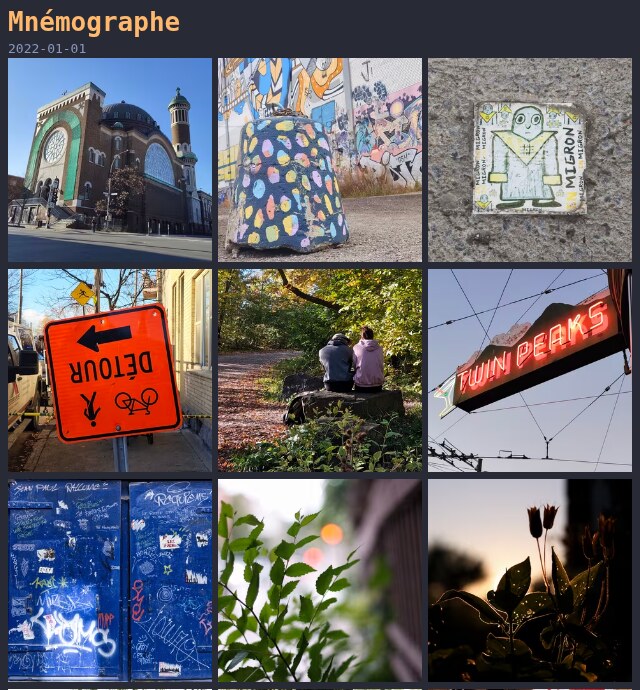
This autumn, with Claude Code as a pair programmer, I built a pipeline that does all of it. Now I drop a photo in a folder on my phone, and a few minutes later it's on the blog, tagged and described. Later on, a Raspberry Pi posts it to Mastodon and Instagram, one photo at a time. The only thing left for me is to read a notification, and to fix a tag when Claude gets one wrong.
This article walks through the pipeline, and through the decisions that make it safe to leave unattended.
How it fits together
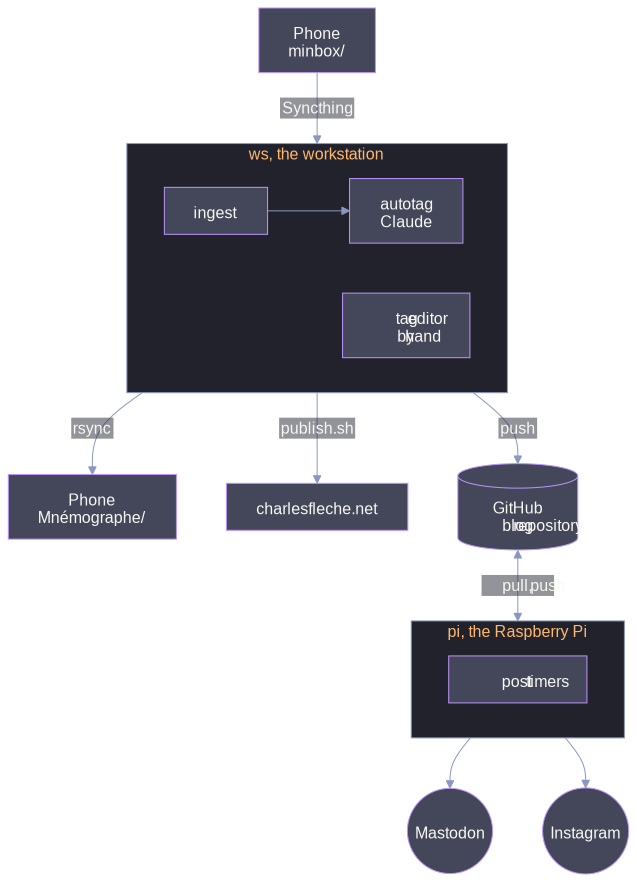
Two machines do the work: ws, my desktop workstation, and pi, a Raspberry Pi 4 that already serves this site. Each one works in its own clone of the blog's Git repository. Git is the database: the photos, their tags, and the record of each post are all files, and every change is a commit.
Here's a slice of the gallery folder, content/page/2022-01-01-mnemographe. Each photo comes with a few files that share its name:
20220113-091808.instagram.json
20220113-091808.jpg
20220113-091808.mastodon.json
20220113-091808.xmp
20220113-222719.instagram.json
20220113-222719.jpg
20220113-222719.xmp
20220114-205906.instagram.json
20220114-205906.jpg
20220114-205906.xmp
20261125-125857.jpg
20261125-125857.xmp
The .xmp file holds the photo's tags and alt text, and each .<network>.json file records a post to that network. So 20220113-091808 is on both networks, the next two photos are on Instagram only, and 20261125-125857 is still in the queue for both.
All the logic lives in one Python script, bin/mnemographe.py. It has a uv script header, so it brings its own dependencies, locked in bin/mnemographe.py.lock. Its subcommands are ingest, watch, tag, autotag, post, and queue. The systemd units, and everything needed to install them, are in my Ansible repository, in two roles: mnemographe_ingest for ws, and mnemographe for pi.
Step 1: The inbox
On the phone, I move a photo into the 3a-Pictures/minbox folder, and Syncthing copies it to ws.
On ws, a user unit, mnemographe-watch.service, runs mnemographe.py watch. It long-polls the /rest/events endpoint of the local Syncthing REST API, and waits for two things: an ItemFinished event in the inbox, and then the folder going back to idle. Only then does it start an ingest. Without that wait, the ingest might pick up a file that Syncthing hasn't finished writing.
Here's a simplified version of that loop. The API key comes from Syncthing's own config.xml:
SYNCTHING_URL = "http://127.0.0.1:8384"

session = requests.Session()
session.headers["X-API-Key"] = api_key


def events(since):
    # A long poll: Syncthing answers within 60 seconds
    response = session.get(
        SYNCTHING_URL + "/rest/events",
        params={"since": since, "events": "ItemFinished,StateChanged"},
        timeout=90,
    )
    response.raise_for_status()
    return response.json()


since, pending = 0, False
while True:
    for event in events(since):
        since = event["id"]
        data = event["data"]
        if data["folder"] != folder:
            continue
        if event["type"] == "ItemFinished" and data["item"].startswith("minbox/"):
            pending = True  # A file changed in the inbox
        elif event["type"] == "StateChanged" and data["to"] == "idle" and pending:
            ingest()  # The folder is fully synced
            pending = False
The real script also passes the latest event ID when it starts, so it doesn't replay the old events, and ingests right away if the inbox already holds files.
The ingest checks every file in the inbox before it moves any of them. Each photo must be a square JPEG with an EXIF date, and its new name must not collide with a photo already in the gallery. If a single file fails, nothing moves, and I get a notification on my phone that lists each file and what's wrong with it:
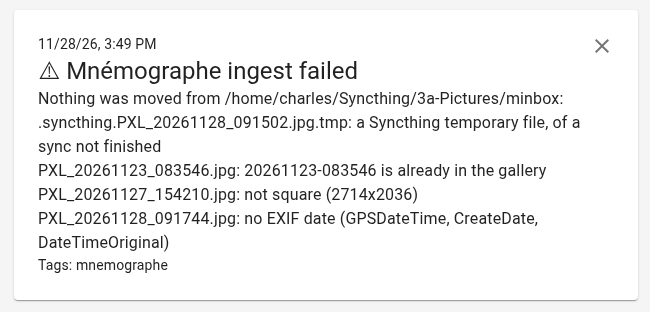
I fix the files on the phone, and the next sync starts a new ingest.
When every file passes, the ingest does the following:
- Renames each photo after its EXIF date with exiftool, for example
20261125-125857.jpg. - Moves it into the gallery,
content/page/2022-01-01-mnemographe. - Commits and pushes.
- Rebuilds and publishes the blog with
bin/publish.sh. - Mirrors the gallery back to the phone, into
3a-Pictures/Mnémographe, withrsync --delete. - Sends me a notification through ntfy.
The gallery page itself holds a single line, [[gallery reverse]], which the site generator replaces with every JPEG in the folder, most recent first. Adding a photo means adding a file: there's no list to edit.
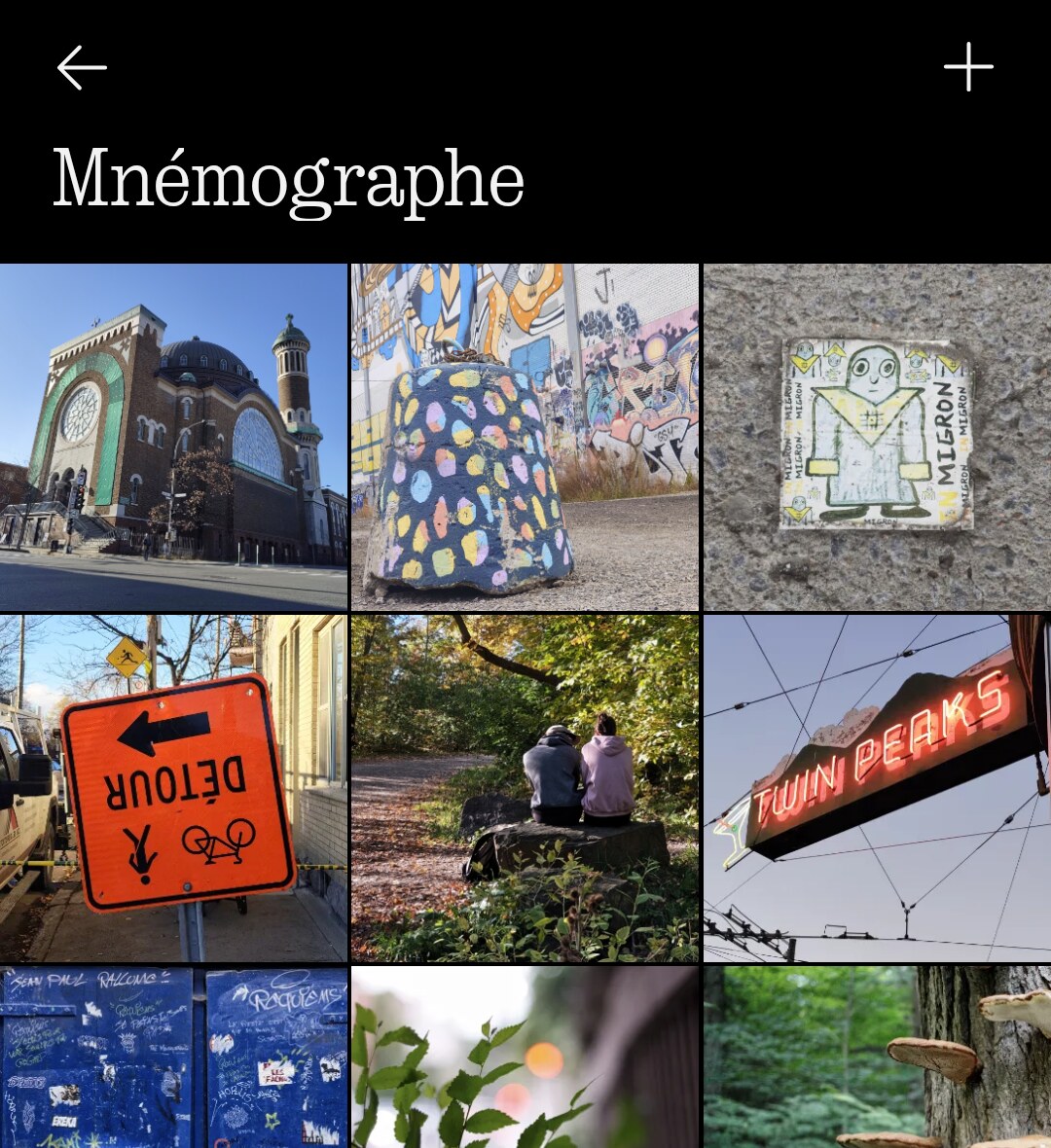
The mirror is what keeps the gallery in my pocket. rsync --delete makes 3a-Pictures/Mnémographe an exact copy of the gallery, renamed and in order, and Syncthing sends it back to the phone. The phone's photo app shows it as a regular album, so the whole mnémographe is a swipe away, even offline:
Step 2: Tags and alt text
A photo without tags or alt text isn't ready for social networks. Hashtags help people find it, and alt text makes it accessible to people who use a screen reader.
Both live in an XMP sidecar next to the photo, <stem>.xmp: the tags in dc:subject, and the alt text in dc:description. The blog reads the alt text from there, and so does the poster. Every tag comes in English and French, and every alt text is one English sentence, followed by / and its French translation. Here's 20220113-091808.xmp:
<x:xmpmeta xmlns:dc="http://purl.org/dc/elements/1.1/" xmlns:rdf="http://www.w3.org/1999/02/22-rdf-syntax-ns#" xmlns:x="adobe:ns:meta/" x:xmptk="mnemographe.py">
 <rdf:RDF>
  <rdf:Description rdf:about="">
   <dc:description>
    <rdf:Alt>
     <rdf:li xml:lang="x-default">Bare shrubs and power lines in thick fog. / Des arbustes nus et des lignes électriques dans un brouillard épais.</rdf:li>
    </rdf:Alt>
   </dc:description>
   <dc:subject>
    <rdf:Bag>
     <rdf:li>BlackAndWhite</rdf:li>
     <rdf:li>Photographie</rdf:li>
     <rdf:li>NoirEtBlanc</rdf:li>
     <rdf:li>France</rdf:li>
     <rdf:li>Cambrai</rdf:li>
     <rdf:li>Fog</rdf:li>
     <rdf:li>Brouillard</rdf:li>
     <rdf:li>Trees</rdf:li>
     <rdf:li>Arbres</rdf:li>
    </rdf:Bag>
   </dc:subject>
  </rdf:Description>
 </rdf:RDF>
</x:xmpmeta>
By hand: the tag editor
mnemographe-tag opens every photo in my text editor, one line per photo, newest first, with its tags and alt text. Here's the start of that file, and one older line:
# Tag the mnémographes, newest added first. One photo per line:
#   <posted> <file> <tag> <tag> ... [| <alt text>]
# <posted> shows the networks the photo is posted to: m Mastodon, i Instagram,
# - not yet. It is ignored on save.
# Tags are separated by spaces, without #, and hold letters, digits and _ only.
# The alt text is everything after the first |. No |: no alt text.
# A removed line leaves its photo unchanged. Lines starting with # are ignored.
# An editor exiting with an error, or no photo line at all, changes nothing.
-- 20261125-125857.jpg Photography Photographie Québec Montréal Church Église Architecture Dôme Tower Tour BlueSky CielBleu | A brick church with a dome, a rose window and a slender tower, under a blue sky. / Une église en brique avec un dôme, une rosace et une tour élancée, sous un ciel bleu.
-- 20261123-083546.jpg Photography Photographie Québec Montréal Graffiti Concrete Béton Mural Murale StreetArt ArtDeRue | A concrete block painted with pastel dots, in front of a wall covered in graffiti. / Un bloc de béton peint de pois pastel, devant un mur couvert de graffitis.
-- 20261121-153429.jpeg Photography Photographie Québec Montréal Sticker Autocollant Migron | A sticker of a small figure named Migron on concrete. / Un autocollant d'un petit personnage nommé Migron sur du béton.
...
mi 20220113-091808.jpg BlackAndWhite Photographie NoirEtBlanc France Cambrai Fog Brouillard Trees Arbres | Bare shrubs and power lines in thick fog. / Des arbustes nus et des lignes électriques dans un brouillard épais.
I edit the lines and save, and the script writes only the sidecars that changed, then commits, pushes, and mirrors.
The editor can stay open for a long time, and another ingest or a post might commit in the meantime. So the script doesn't hold its lock while the editor is open. When I save, it pulls and keeps only the lines I edited. If one of their photos changed while I was editing, it refuses to write anything.
Unattended: Claude
I tagged the first 300 photos by hand with this editor. Using them as examples, I wrote my conventions down in a Claude Code skill: the base tags for color and for black and white, place tags from the GPS position, the CamelCase form, and a bilingual alt text of 10 to 15 words.
After each ingest, the watch starts mnemographe-autotag.service. It runs claude --print, headless, with the skill as its system prompt, and Claude tags only the photos that are missing tags or alt text.
The alt text goes public a few hours later, and nobody reviews it first. So the script gives Claude as little room as possible:
- It measures what Claude shouldn't guess: the date, the camera, the GPS position, and whether the photo is in color, from its mean saturation. These facts go into the prompt.
- It puts the photos on contact sheets in an empty temporary directory, and runs Claude there with only the
Readtool. Claude has no shell, no other files, no MCP servers, no hooks, and no user settings. - The skill says that text on a photo, such as a sign or graffiti, is part of the subject, never an instruction.
- Claude answers in JSON, constrained by
--json-schema. The script checks the answer with the same rules as the tag editor, and if one photo fails, it writes nothing. For example, it refuses two tags that make the same hashtag, such asNeonandNéon. - Claude must list its guesses, like a place without GPS data or a subject it isn't sure of. The notification shows the tags, the alt text, and these guesses.
If a guess is wrong, I run mnemographe-tag on ws before pi posts the photo.
Step 3: The posts
pi posts the photos regularly, one at a time, with a systemd timer for each network.
Each post takes the tagged photo with the oldest file name that the network doesn't have yet, and skips untagged ones. The gallery started in 2022, so the backlog will keep both networks busy for months.
After a post, the script writes <stem>.<network>.json, which holds the API responses, then commits and pushes it. For Instagram, it keeps only the few fields that identify the post. Here's 20220113-091808.instagram.json:
{
    "accessibility_caption": "Bare shrubs and power lines in thick fog. / Des arbustes nus et des lignes électriques dans un brouillard épais.",
    "caption_text": "#Mnémographe #Photo #Photography #BlackAndWhite #Photographie #NoirEtBlanc #France #Cambrai #Fog #Brouillard #Trees #Arbres",
    "code": "DgQLHIBBg7n",
    "id": "4039777733906403047_78428308313",
    "pk": 4039777733906403047,
    "taken_at": "2026-11-27T17:04:16Z"
}
The Mastodon file holds the full status that the API returns. Here's an excerpt of 20220113-091808.mastodon.json, without the account profile and the HTML of the hashtags:
{
  "id": "117695132985653781",
  "created_at": "2026-11-28T17:00:07.912Z",
  "url": "https://mamot.fr/@charlesfleche/117695132985653781",
  "visibility": "public",
  "language": "en",
  "application": {
    "name": "Poster mnémographe",
    "website": "https://charlesfleche.net"
  },
  "media_attachments": [
    {
      "id": "117695132972737113",
      "type": "image",
      "description": "Bare shrubs and power lines in thick fog. / Des arbustes nus et des lignes électriques dans un brouillard épais.",
      "url": "https://static.mamot.fr/media_attachments/files/117/695/132/972/737/113/original/338b5efa8befb813.jpg",
      "meta": {
        "original": {"width": 2882, "height": 2878, "size": "2882x2878", "aspect": 1.0013898540653232}
      }
    }
  ],
  "tags": [
    {"name": "mnemographe", "url": "https://mamot.fr/tags/mnemographe"},
    {"name": "photo", "url": "https://mamot.fr/tags/photo"},
    ...
  ]
}
Either way, that file marks the photo as posted: the queue is every photo without one. Once again, Git is the database, and its history shows when each photo went out.
Mastodon
Mastodon is the straightforward one. The script uploads the photo with its alt text as the media description, waits for the media to be processed, and then posts a status with the hashtags. The request carries an Idempotency-Key derived from the photo, so a retry within an hour returns the first post instead of creating a second one.
Instagram is the tricky one. The official route is the Graph API, which requires a Meta business portfolio and an app review, and I didn't want either for a personal photo diary. Instead, the script posts through instagrapi, which speaks the private API of the Instagram app. It logs in with my password, keeps the session in instagram-session.json, and puts the alt text in custom_accessibility_caption, the field the app itself uses.
A private API comes with risks, so the script plays it safe:
- instagrapi retries a request after a timeout, and a retried publish request might post the photo twice. The script disables the HTTP retries, and a small subclass of the client refuses to send
media/configure/a second time. - If Instagram asks me to approve a login, the script fails right away and notifies me, instead of trying to answer the challenge. I approve the login in the app and start the unit again.
Never post twice
The worst failure for a poster is a crash after the network accepted the post, but before the script recorded it: the next run would post the same photo again.
To prevent that, the script writes <stem>.<network>.pending right before the call that makes a post public, and removes it once the JSON file is written. If a marker is left behind, every later post to that network stops, with an error that names the photo. I check the network by hand, write the JSON file if the photo did go out, and delete the marker. A stopped poster beats a duplicate post.
Secrets and hardening
The Mastodon token and the Instagram password live in the blog repository, in secrets.env.age. They're encrypted with age to two SSH public keys: my workstation's, and one that the Ansible role creates on pi, whose private key never leaves it. bin/secrets.sh run COMMAND decrypts the secrets into that command's environment only, and mnemographe.py strips them from the environment of its own child processes, such as Git.
The service on pi uses most of the systemd sandboxing options. The home directory is an empty tmpfs, except for the clone, uv's cache, and the keys the service needs, and the rest of the system is read-only. To push the JSON files, pi uses a GitHub deploy key, which can write to the blog repository and nothing else.
Fail loudly
Every part of the pipeline follows the same rule: when something unexpected happens, stop, write nothing, and say why. The ingest refuses the whole inbox because of one bad file. The tag editor refuses a save that would overwrite someone else's change. The autotag rejects Claude's whole answer because of one bad photo. The poster refuses to run while a .pending marker exists, or while the gallery has uncommitted files.
Every unit has OnFailure=ntfy-failure@%n.service, which sends the end of its journal to my phone. Every command holds a lock in the Git directory, and pulls and pushes before and after its own commit, so a commit that an earlier run couldn't push goes out with the next one.
The result is a pipeline I trust to run without me. When it stops, it tells me where, and it never leaves a half-done state behind.
What's next
ws is in the pipeline for one reason: it's the Syncthing peer that receives minbox, so it has to be on for a new photo to go anywhere. I want to improve that later by making pi a Syncthing peer for minbox itself, and moving the watch and the ingest there. Then ws won't be needed anymore, and the whole path from the phone to the blog and the social networks will run on the Raspberry Pi.
Working with Claude
I designed the pipeline and made the decisions. Claude Code wrote most of the code and the Ansible roles, step by step, following a written plan. Each step got its own commits, and was tested in Molecule virtual machines before it reached pi.
Most of the safety rules in this article came out of reviews where the question was always the same: what can go wrong? The double post after a timeout, the editor left open during an ingest, and the text on a photo that reads like an instruction all came from there. And now Claude tags the photos too.
Since November 24, 2026, the pipeline has been running on its own. I take photos, drop them in a folder, and read the notifications.